Introducing Paratext
Mike Saunders · 9th July 2026
Some context
One of the things I've heard repeatedly when talking to different libraries is that they're interested in using some kind of machine learning to venture into, eg, automatic metadata creation - but there are too many questions and variables to know where to begin. Which model, who owns it, who looks at it, how do we know when it's good/done, on-prem or cloud, what do we do next. Others have (for example) got as far as pasting a few images into a copilot chat panel to see what comes out, and are surprised or unimpressed (or both) with the results.
We've had all this in mind when working through all these questions ourselves, and wanted to see if we could sidestep one of the usual things happening: a whole sector of libraries, archives, museums trying to answer these questions in independent silos, with no mechanism for sharing. Thankfully there's already the AI4LAM community, but it can sometimes feel like you need to have done something before joining an interest group.
So it was important from the start that this project was relevant to other libraries. We wanted to make something that people could use to hit the ground running and experiment without needing to learn the history of LLMs, inference servers, prompt engineering, all that stuff. Something that brought metadata experts into the fold, trusting in their ability to test and improve the output, and providing them with a frictionless way to do that. I wanted the project to be meticulously documented, maintainable, open source, portable, and intuitive. This goes from chosing sensible defaults for the stack, but keeping it modular: leaving room to easily switch out models, datasets, endpoints, schemas, and prompts. What made sense for me was a simple CLI to interact with the processing side; and a well designed, fast, inuitive benchmarking web UI for human-in-the-loop checking.
What it is
To that end we've been working on Paratext. There's still work to be done, but I think it's in a place where that work can be done in the open.
For a more detailed implementation readme/walkthrough, go straight to paratext on github - this is going to be a high level overview, with a couple of technical fly-bys.
A quick tech demo
paratext is the command line interface (cli) for bringing several workflow commands together. Here's how to use it.
-
Clone and install paratext
git clone https://github.com/nls-lst/paratext.git cd paratext uv tool install paratext -
Start a new project
This will create the project skeleton and walk through a few config questions. Alternative you can runparatext new project-nameparatext configopen the configuration file in your default terminal editor, or just openconfig.tomland edit directly. -
Set a schema and a prompt for the project
Edit /schema.py and prompt.md with general context for the model and the structure you want to pull from the images (eg, Title, Author, Publisher, Shelf location)
- Test the output
paratext run -p project-name --limit 50 # stops paratext after 50 images
It saves the output to a JSONL file. When done, it spins up a 'review' frontend on port 5050 where you can see the cards, the output, and mark it as 'good enough', 'needs tweaks', or 'not accurate'.
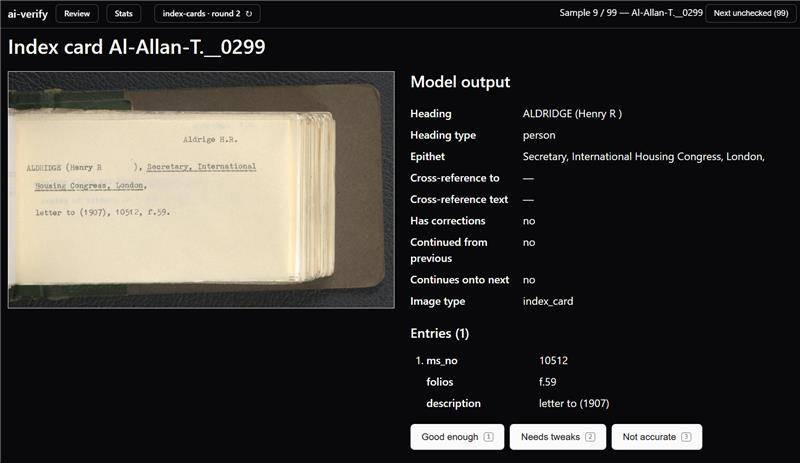
Every new run you do adds a round to that project so you can track prompt diffs and accuracy changes.

That's it. Rinse and repeat. When you've hit your accuracy score, remove the --limit and it will run over everything in your /images folder.
How it works
Basic use
You can give it a set of images, a set of instructions, and the fields you want to extract. After linking it up to an LLM (local or remote), it will run over a sample of the images and save the output to a data file, and then launches a 'review' webpage in which you can see:
- The original image
- The structured output
- Buttons to say whether the output is 'good enough', 'needs tweaks', or 'not accurate'.
Iterate until everyone's happy
Every time you refine the prompt to get better results, it saves a snapshot in time, and adds a new version to the review webpage. This means you can keep track of how each round improves (eg, 50% accuracy round 1, 66% accuracy round 2), compare changes and, more importantly, whoever is reviewing the results (we use subject matter experts, like cataloguers and archivists) can see inside the machine - how to prompt local models, and what differences adjustments to instructions make. This helps develop trust, agency, and skills.
Carbon awareness
If you're using a local LLM, selecting the green flag (--green) will look at the energy production forecast for your region for the next 24 hours, and calculate the greenest window to run the project (see this post for more details)
Export to Hugging Face
Once you've got a final round that's hit a level of accuracy you're comfortable with, you can run it over the whole set of images by removing another flag (--limit). At this point, you can also choose to export your raw scans (if you have rights cleared) and human-checked sample set to Hugging Face, to add to the LAM index benchmark. Human-reviewed LLM-output is the gold standard training data that can be used by other libraries to fine-tune models, and to see which model is likely to get the best results from their index cards, or monographs, or whatever it is that you're extracting from. The raw dataset of scans (without human review) is also incredibly valuable to the community, who can use the wide variety of examples to fine tune smaller models on recognising common input types (like index cards).
What's next
Squashing bugs, improving the onboarding, and iterating on different scanrios and use cases. After that it's sharing widely, encouraging other libraries/archives/museums who have been on the edge of this to try it - or using it to simplify workflows they already have.
After that, we'd like to incorporate a version of Annif as an optional extra for more comprehensive metadata extraction from richer material (like full text scans). Although thats a whole other can of worms and ontologies.
In the meantime, this site will be about our tests and failures along this journey, and hopefully incorporating features suggested by the wider community into this tool - or taking what we've learned and building something new together.